SWITEK IML Robot Instruction -- SigmaTek -- Base Setting
Abstract
With the control system developed by the Austria automatic company SIGMATEK GmbH & Co KG, SWITEK high speed side entry IML robot is providing a more efficient and outstanding performance for your quality bulk production of the IML Yogurt Cups.
1.3 Function Screen
1.3.12 Base Setting
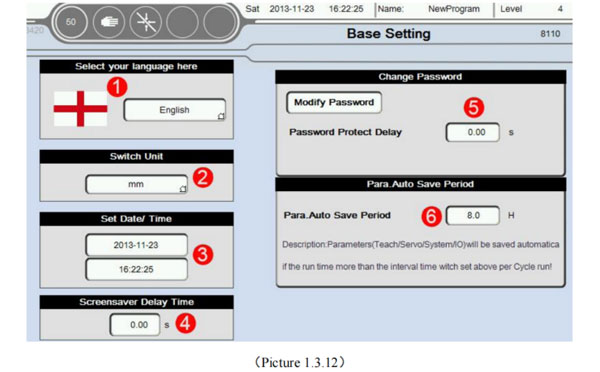
Click Base Setting button into Base Setting screen, as the picture below 1.3.12;
Language settings: If click menu button then can choose a different interface language, currently. System is contains four languages; Deutsch, Turkish, English and Chinese. Also can expansion of language infinitely, according to the needs of users.
The machine unit at runtime, divided into two kinds of mm and inch;
Set Date/Time;
Set the screen saver time. Time is 0 closed screen saver;
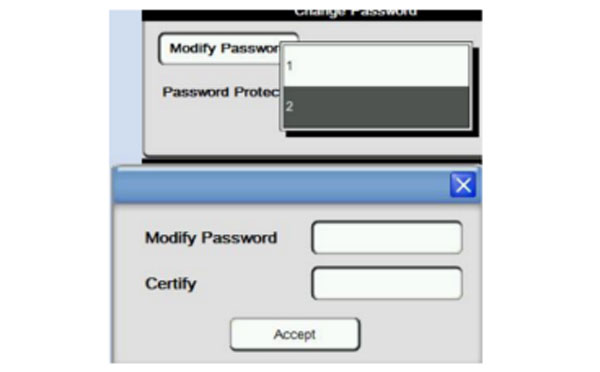
Modify the level 1 to 2 password; level 3 password is for the administrator password (Need to be careful when change). Can not be changed; level 4 password is for the manufacturers (By the manufacturers hold)
First choose the password that need to modify. Selected and input the password of modified to the password change. Second input confirm password again in the confirmation field. Finally click ok button to compete the password change.
Parameters are automatically saved period; When the system switch from automatic to manual and fully automatic running time reaching the set time. Parameters including teaching, servo, system and I/O will be automatically saved once; Attention: Only if it was failure when the switch from automatic to manual. Continuous automatic runtime then parameters will not be saved;
1.3.13 Product Setup
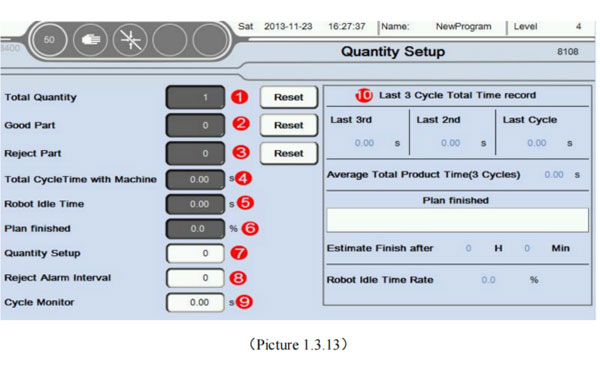
Click Product Setup button into quantity screen, as the picture below 1.3.13:
Total quantity: Machines every action a mold. Numerical automatic plus one. After reset, counting from 0 again;
Good Part: Machines every action a mold. If there is no Reject Part signal input. Numerical automatic plus one. After reset, counting from 0 again;
Reject Part: Machines every action a mold. If there is Reject Part signal input. Numerical automatic plus one. After reset, counting from 0 again;
Total Cycle Time with Machine: Machines every action a mold need cycle time.
Robot Idle Time: After the completion of the robot to take out the products. Waiting for injection mould signal of standby time.
Plan finished: The current production of the setting percentage.
Quantity Setup: Need to set the number of Quantity. When you run the number of module to achieve set value. Stop and alarm prompt.
Reject Alarm Interval: Reached set value when the number of occurrences of Reject signal. Stop and alarm prompt.
Cycle Monitor: If cycle time more than monitoring time. Stop and alarm prompt.
Last 3 cycle total time record: The average shape cycle is average time for the first three period. Predict work completion time is according to the average shape cycle. Automatically calculate how long it will take to get the job done. Robot idle rate is the ratio of idle time and total cycle time;