switek email

sales06@switek.biz

switek whatsapp

+86 186 5927 5869

Подпишитесь на нас

.

High Speed Siden Entry IML Robot SW833-S6

SWITEK IML Robot Instruction -- SigmaTek -- Check Setup

Abstract

With the control system developed by the Austria automatic company SIGMATEK GmbH & Co KG, SWITEK high speed side entry IML robot is providing a more efficient and outstanding performance for your quality bulk production of the IML Yogurt Cups.

1.3 Function Screen

1.3.14 Check Setup

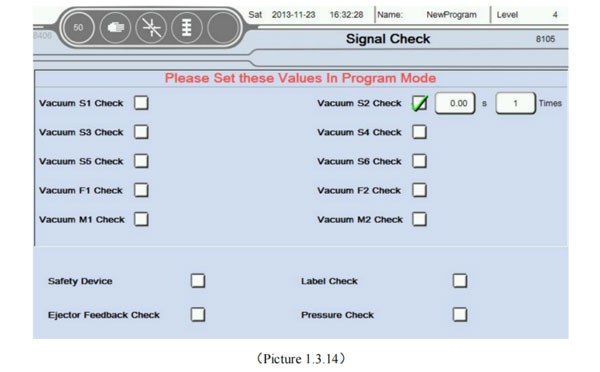
Click Check Setup button into signal check screen, as the picture below 1.3.14;
iml robot control system

Attention: Please Set these values in program mode!
Set whether the corresponding signal detection. If choose detection. During automatic operation, did not detect the signal, will be alarm as the picture above.
iml robot control system

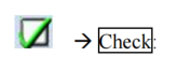
  1. Detection time: After output this point, when reaching set time, then the corresponding signal detection again.
  2. Number of times: Input 0 or 1 that every signal undetectable then alarm, enter 2 absorb less than 2 times in a row or not put then, and so on:

1.3.15 File Save

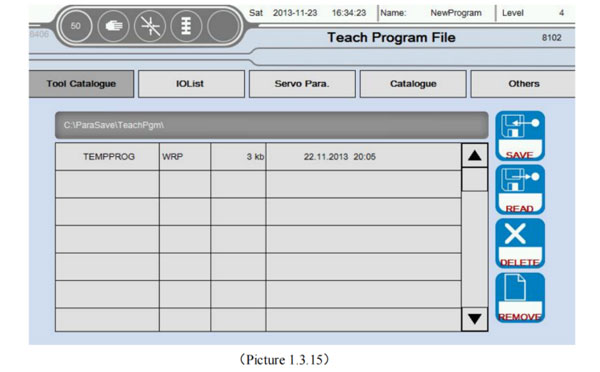
Click File Save button into File Save screen, as the picture belwo 1.3.15:
iml robot control system

This page can save the current machine information, parameter settings, etc., as a backup.

  1. : Represents the teaching editing program;
  2. : Indicates that the configuration of the I/O parameters;
  3. : Indicates that the configuration of the servo parameters;
  4. : Represents the interface other than the above configuration parameters;
  5. : Save system event file;
    iml robot control system
  6. The current file path, when not insert U disk, Otherwise the path for PLC built-in TF card. Insert the usb, the corresponding path defualt to U disk;
  7. Save the file information currently, as the picture below 1.3.15, TEMPPROG is the file name, WRP is the file size, finally, the file save time;
  8. : Press the Save button to save the current machine information;
  9. : Select the saved file is loaded after the point of reading the button to save the file in the machine information, etc.;
  10. : When the file is not saved, you can select the appropriate file click Delete;
  11. : When you want to re-compile a program, press the ReMove button to enter the programming page;


E-mail: sales06@switek.biz

WhatsApp

WeChat


Запросить сейчас
Представлять на рассмотрение

Готовые решения IML