SWITEK IML Robot Instruction -- SigmaTek -- Program Monitor
Abstract
With the control system developed by the Austria automatic company SIGMATEK GmbH & Co KG, SWITEK high speed side entry IML robot is providing a more efficient and outstanding performance for your quality bulk production of the IML Yogurt Cups.
1.3 Function Screen
1.3.7 Vacuum Config
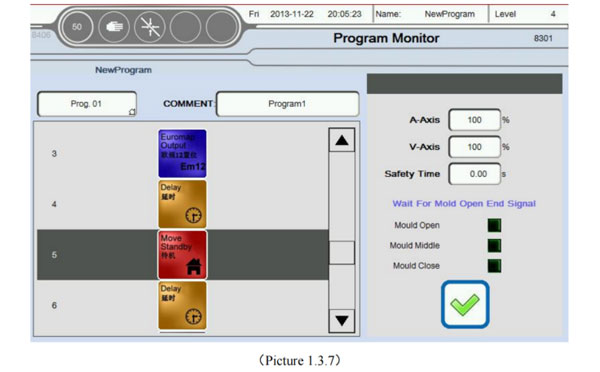
Click Program Monitor button into current page, as the picture below 1.3.7;
When robot run automatically, label will automatically follow the instruction to the current action. And with "Dark gray" highlighted in color. At the same time on the right shows the specific content of the current instruction.
1.3.8 Axis Assignment
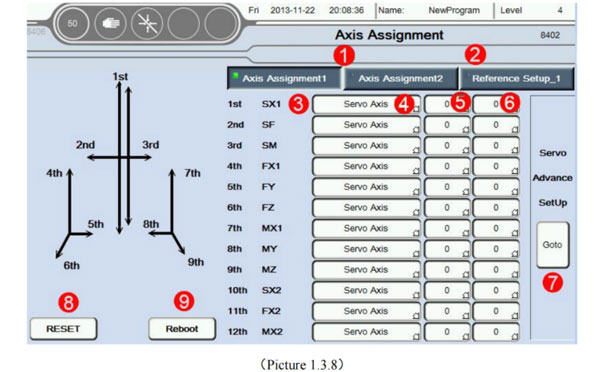
Click Axis Assignment button into current page. as the picture below 1.3.8;
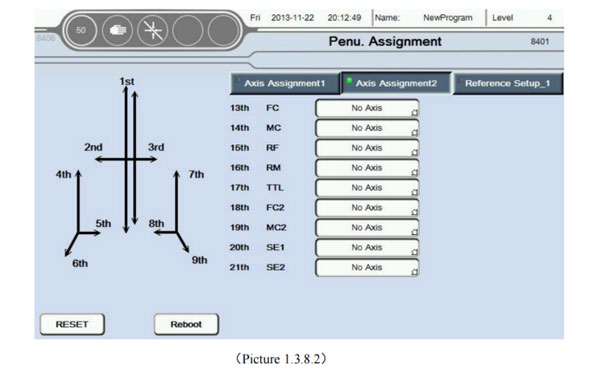
Axis Assignment: (Click Axis Assignment 2 into Penu. axis choose, as the picture below 1.3.8.2);
Home setup: Set axis to reference point of the relevant settings;
The current name of axis: Can be based on rename the axis after click on the name of the axis;
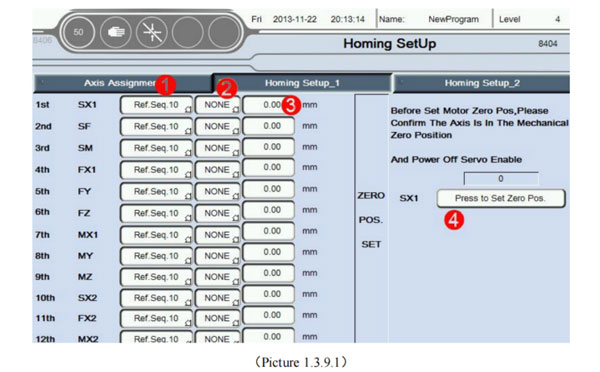
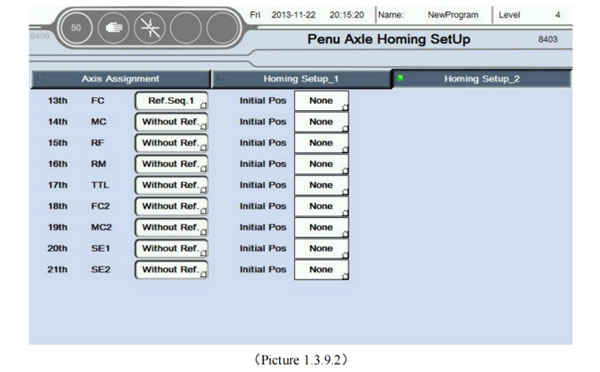
Set axis type: Can choose servo axis, pneu. axis or no choose (do not use this axis; Click on the reference point setting 1, into the reference point setting 1, as the picture below 1.3.9.1; Click on the reference point setting 2, into the reference point setting 2 as the picture below 1.3.9.2;)
Set reference point sequence; In total, can be set level 10 reference point sequence. When reference point. Axis in order from small order to big order movement (To run the first order 1, second 2 ...... last 10);
Choose the reference point: Can choose no choose or the reference point, if choosing a reference point. Only when in the corresponding of the axis induction to the point of the reference signal, can be zero. Otherwise the alarm to zero does not meet the conditions. On the other hand, the axis to zero without being limited by the reference point;
Set each axis zero offset: after all the axis to zero. If exist offset with ideal position, the offset position can be set to the ideal position. Offset of the Servo axis unit is mm. The position offset of pneumatic axis have three options; No, the maximum and minimum values;
Click the button to set the current point is zero. Attention:
Please make sure the axis in the mechanical zero point position, and make sure the motor enable has been closed, before set the mechanical point;
Mechanical zero setting is only applicable to absolute value of motor of use the Sigmatek driver (MDD/SDD);
The condition of zero: Mould outside signal + Mould complete signal + The reference zero signal (If the conditions are selected as the reference point + Currently no alarm). Otherwise the alarm return does not meet the conditions;
Set type of return: The same as upper of zero sequence Settings;
The initial position is set: The same as upper of zero offset Settings;